Use of Color
The following criteria are taken from the checklist:
- Information is not conveyed only through color.
Content that is conveyed exclusively via colors is not accessible to blind users and is difficult to access for users with color vision deficiencies.
Accordingly, content may not only be highlighted using colors, but must also be distinguished by other means such as indentations, font sizes and font weights.
The following criteria are taken from the checklist:
- Information is not conveyed only through color.
Content that is conveyed exclusively via colors is not accessible to blind users and is difficult to access for users with color vision deficiencies.
Accordingly, content may not only be highlighted using colors, but must also be distinguished by other means such as indentations, font sizes and font weights.
Markup of Highlighted Information
In Ilias, bold, italic, and underline are not properly marked. They can still be used, but they are not recognized by screen readers and are therefore a barrier for screen reader users.
In addition to colors and font sizes, the following options are available for highlighting text:
OPAL editor:
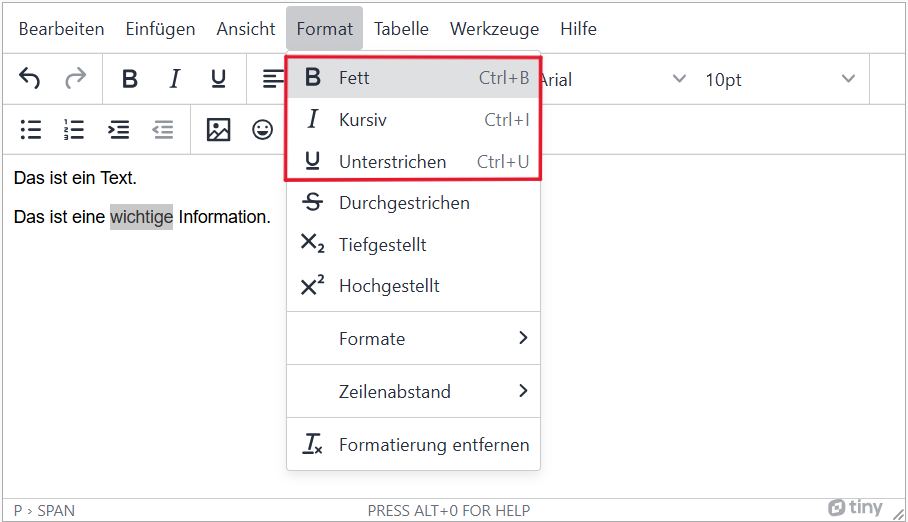
Menu bar: Format > Bold or Italic or Underline
OPAL editor:
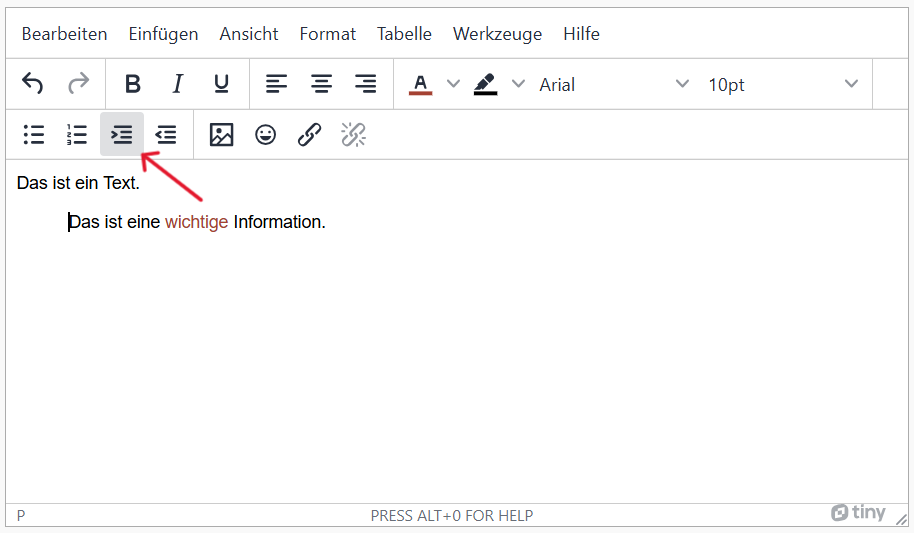
Indentation: Thrid row of menu bar > third icon 'Increase indent'
The following criteria are taken from the checklist:
- Information is not conveyed only through color.
Content that is conveyed exclusively via colors is not accessible to blind users and is difficult to access for users with color vision deficiencies.
Accordingly, content may not only be highlighted using colors, but must also be distinguished by other means such as indentations, font sizes and font weights.
Realization of the criteria
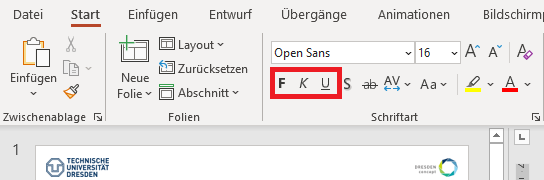
Menu bar: Home > Font > Bold/Italic/Cursive
The following criteria are taken from the checklist:
- Information is not conveyed only through color.
Content that is conveyed exclusively via colors is not accessible to blind users and is difficult to access for users with color vision deficiencies.
Accordingly, content may not only be highlighted using colors, but must also be distinguished by other means such as indentations, font sizes and font weights.
Markup of Highlighted Information
HTML tags:
Bold: <strong>, Italic: <em>
CSS code is required to implement the following criteria.
Indentation:
Add the style attribute to the tag and define the size of the indentation in percent or em using margin-left.
<p style="margin-left: 2em">Diese Aussage ist eingerückt.</p>
The following criteria are taken from the checklist:
- Information is not conveyed only through color.
Content that is conveyed exclusively via colors is not accessible to blind users and is difficult to access for users with color vision deficiencies.
Accordingly, content may not only be highlighted using colors, but must also be distinguished by other means such as indentations, font sizes and font weights.
In addition to colors and font sizes, the following options are available for highlighting text:
Bold: Menu bar: Home > Font > Bold
Italic: Menu bar: Home > Font > Italic
Underlined: Menu bar: Home > Font > Underline
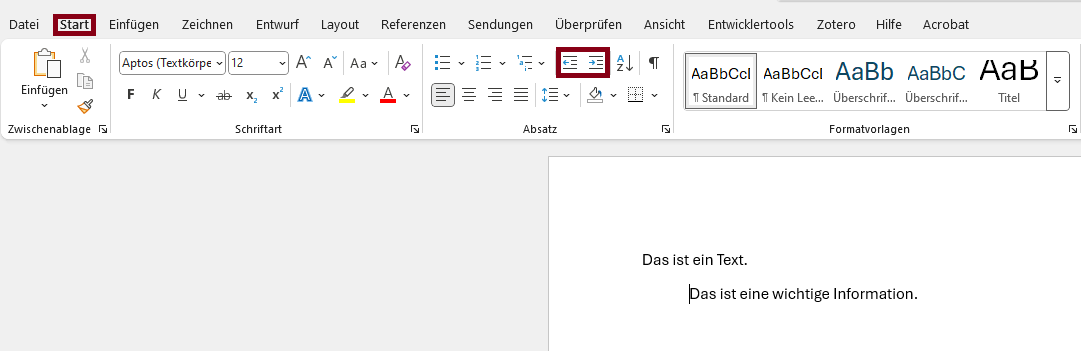
Microsoft Word: Menu bar: Home > Paragraphs > Decrease/Increase Indent
Microsoft Word: Menu bar: Home > Paragraphs > Decrease/Increase Indent
The following criteria are taken from the checklist:
- Information is not conveyed only through color.
Content that is conveyed exclusively via colors is not accessible to blind users and is difficult to access for users with color vision deficiencies.
Accordingly, content may not only be highlighted using colors, but must also be distinguished by other means such as indentations, font sizes and font weights.
In addition to colors and font sizes, the following options are available for highlighting text:
                  \textbf{I want this text to be bold.}

                  \textit{I want this text to be italic.}

                  \underline{I want this text to be underlined.}
Indent Text
\hspace{24 px}The following line is indented.