Contrast of Texts
The following criteria are taken from the checklist:
- Text-background contrast is sufficient: at least 4.5 : 1 for small font and 3 : 1 for large font.
Good contrasts help to make texts easy to read. This is particularly helpful for people with visual and color vision impairments.
Font sizes larger than 24px or 18pt are considered large fonts. For bold fonts, this already applies to 18.7px or 14pt and higher. Such large fonts must fulfill a contrast ratio of 3:1. All font sizes smaller than this are more difficult to read and therefore require a higher contrast of 4.5:1.
The color contrast of texts can be tested with the Colour
Contrast Analyser (CCA)
. Further information on this can be found in the manual entry for
Color Contrast Tools
Markup of Colored Text
OPAL editor:
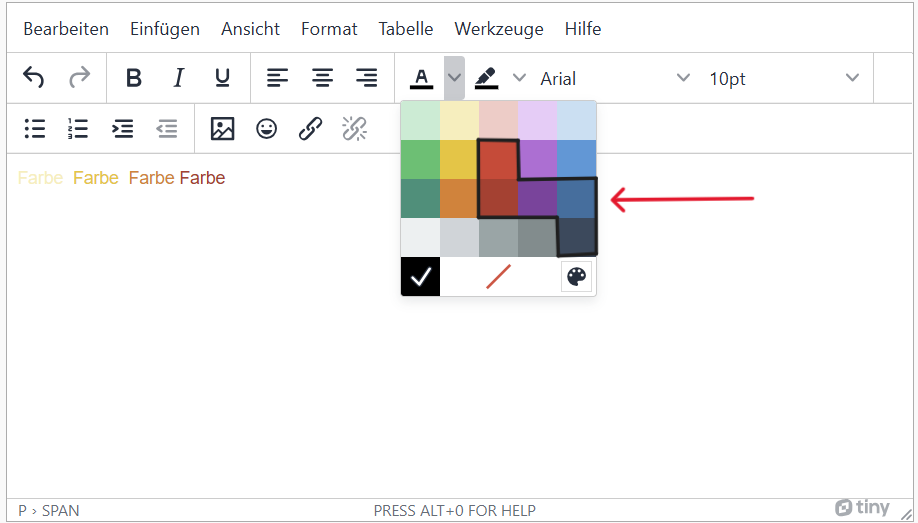
toolbar > Select icon for text color
Select text colors with good contrast. In the OPAL color palette, these are the dark red, violet and blue tones in the third line. Green and orange from the third line can also be used for large fonts.
The following criteria are taken from the checklist:
- Text-background contrast is sufficient: at least 4.5 : 1 for small font and 3 : 1 for large font.
Good contrasts help to make texts easy to read. This is particularly helpful for people with visual and color vision impairments.
Font sizes larger than 24px or 18pt are considered large fonts. For bold fonts, this already applies to 18.7px or 14pt and higher. Such large fonts must fulfill a contrast ratio of 3:1. All font sizes smaller than this are more difficult to read and therefore require a higher contrast of 4.5:1.
The color contrast of texts can be tested with the Colour
Contrast Analyser (CCA)
. Further information on this can be found in the manual entry for
Color Contrast Tools
Markup of Colored Text
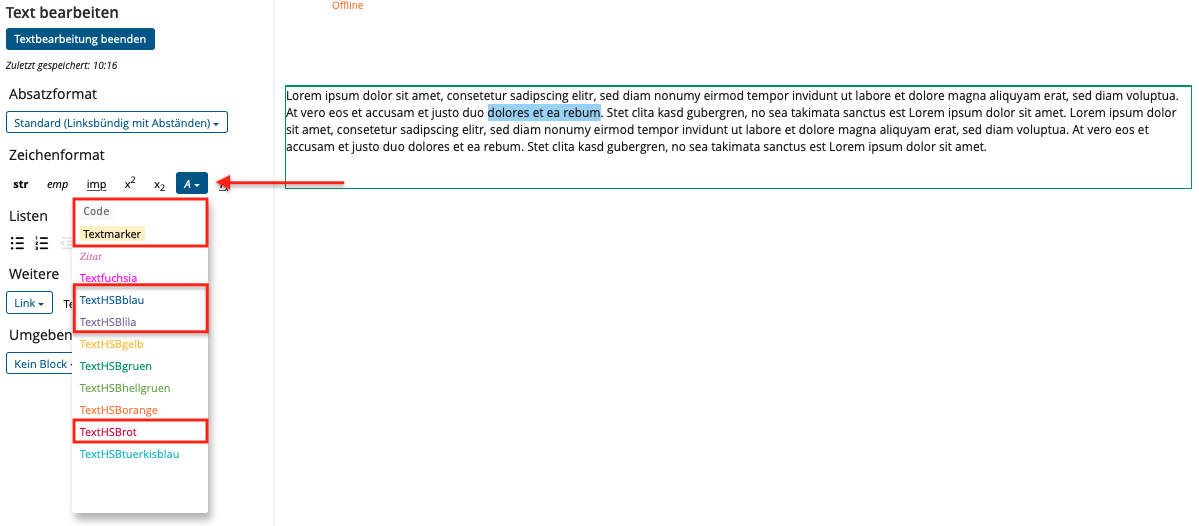
The text colors code, highlighter, blue, purple, and red have good contrast ratios. Other text colors should be avoided.
Add text colors
-
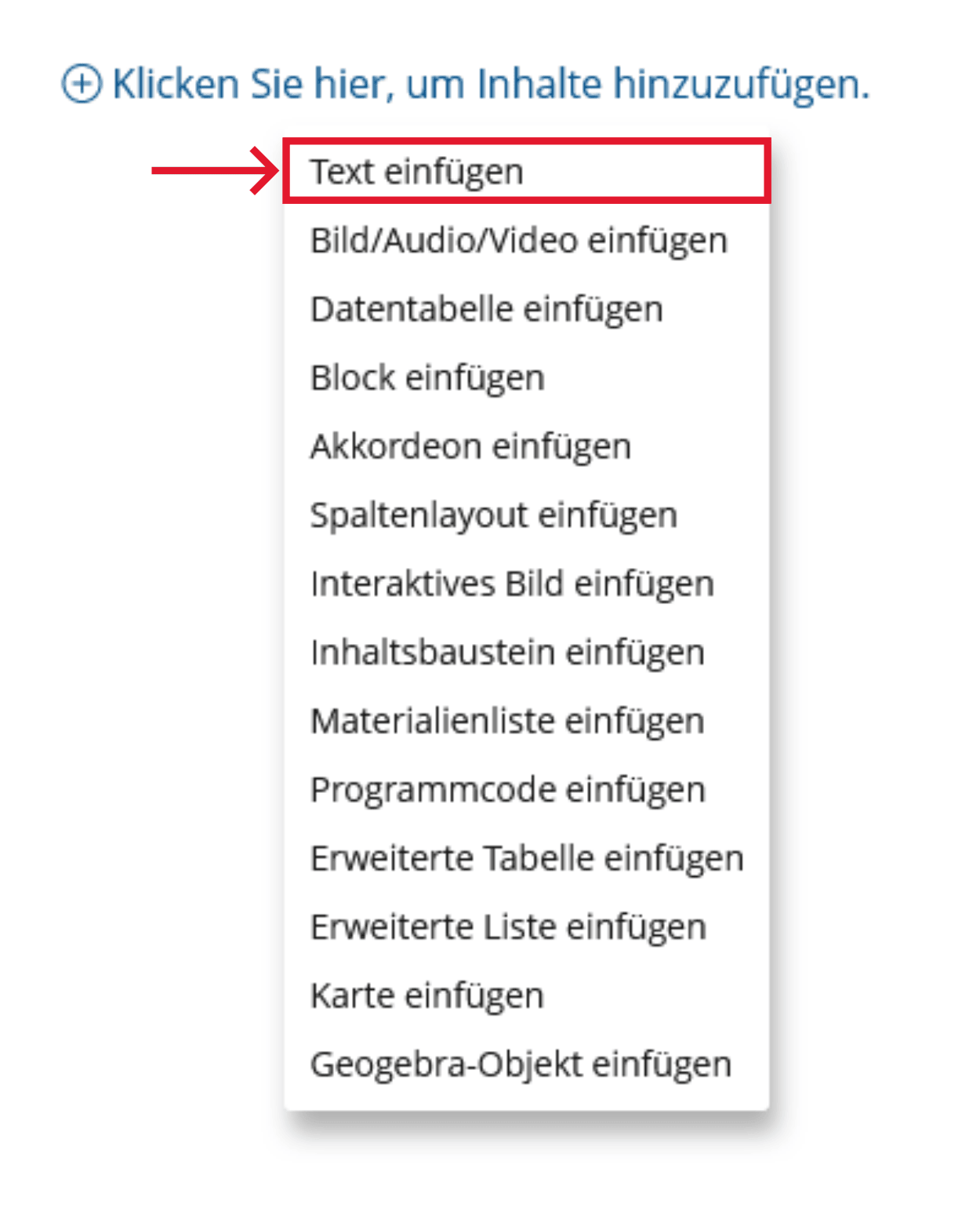
Click the plus sign and choose "Insert Text".
-
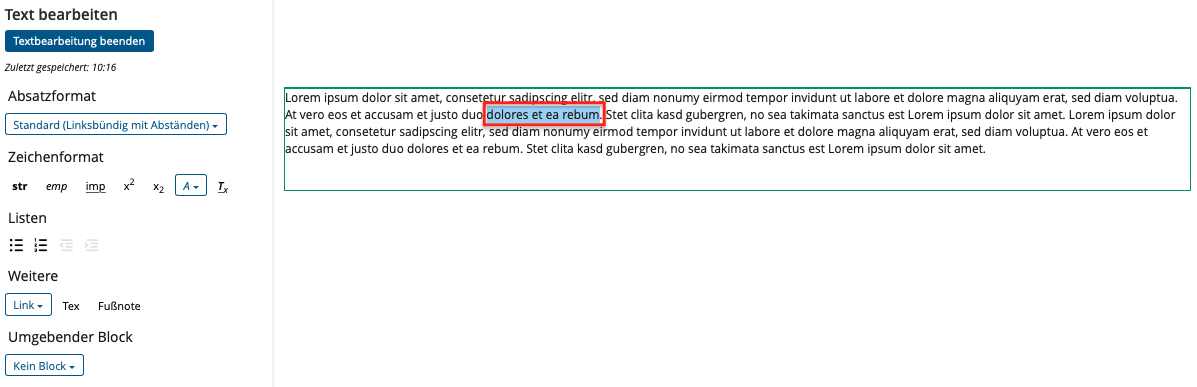
Select the text that you want to change the color of.
-
Click the "A" button under "Character Format" and select the color you want.
The following criteria are taken from the checklist:
- Text-background contrast is sufficient: at least 4.5 : 1 for small font and 3 : 1 for large font.
Good contrasts help to make texts easy to read. This is particularly helpful for people with visual and color vision impairments.
Font sizes larger than 24px or 18pt are considered large fonts. For bold fonts, this already applies to 18.7px or 14pt and higher. Such large fonts must fulfill a contrast ratio of 3:1. All font sizes smaller than this are more difficult to read and therefore require a higher contrast of 4.5:1.
The color contrast of texts can be tested with the Colour
Contrast Analyser (CCA)
. Further information on this can be found in the manual entry for
Color Contrast Tools
Realization of the criteria
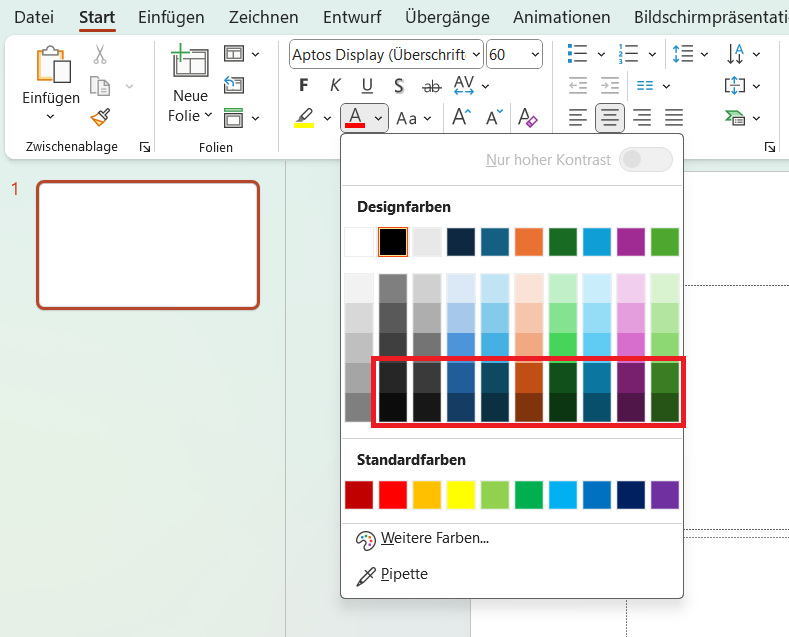
Use colors with high contrasts. With a white background, this corresponds to the bottom two lines of the colors offered by PowerPoint.
Menu bar: Start > Font > Font color
The following criteria are taken from the checklist:
- Text-background contrast is sufficient: at least 4.5 : 1 for small font and 3 : 1 for large font.
Good contrasts help to make texts easy to read. This is particularly helpful for people with visual and color vision impairments.
Font sizes larger than 24px or 18pt are considered large fonts. For bold fonts, this already applies to 18.7px or 14pt and higher. Such large fonts must fulfill a contrast ratio of 3:1. All font sizes smaller than this are more difficult to read and therefore require a higher contrast of 4.5:1.
The color contrast of texts can be tested with the Colour
Contrast Analyser (CCA)
. Further information on this can be found in the manual entry for
Color Contrast Tools
Markup of Colored Text
CSS code is required to implement the following criteria.
Colored text:
Add the style attribute to the structure element and specify a color value in the color property. This can be hexadecimal in the form #ffffff or an RGB value in the form rgb(255,255,255).
<p style="color: #1f4180;">Das ist ein farbiger Satz.</p>
The following criteria are taken from the checklist:
- Text-background contrast is sufficient: at least 4.5 : 1 for small font and 3 : 1 for large font.
Good contrasts help to make texts easy to read. This is particularly helpful for people with visual and color vision impairments.
Font sizes larger than 24px or 18pt are considered large fonts. For bold fonts, this already applies to 18.7px or 14pt and higher. Such large fonts must fulfill a contrast ratio of 3:1. All font sizes smaller than this are more difficult to read and therefore require a higher contrast of 4.5:1.
Markup of Colored Text
Microsoft Word:
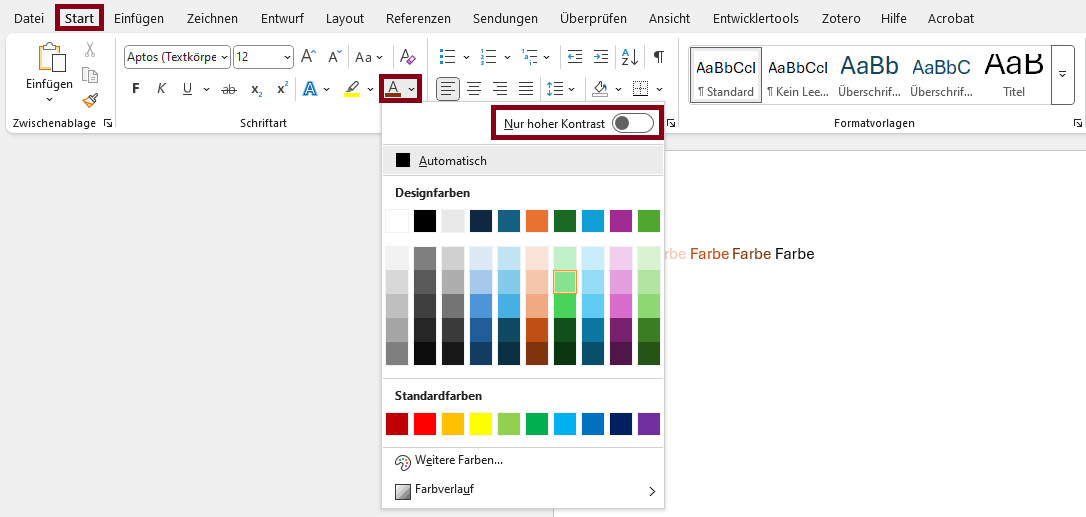
Menu bar: Home > Font > Font Color
Select the “High-contrast only” option to hide the colors that have low contrast on a white background.
You can also hover your mouse over the color boxes to get more information about the contrast.
You can also hover your mouse over the color boxes to get more information about the contrast.
Microsoft Word:
Menu bar: Home > Font > Font Color
The following criteria are taken from the checklist:
- Text-background contrast is sufficient: at least 4.5 : 1 for small font and 3 : 1 for large font.
Good contrasts help to make texts easy to read. This is particularly helpful for people with visual and color vision impairments.
Font sizes larger than 24px or 18pt are considered large fonts. For bold fonts, this already applies to 18.7px or 14pt and higher. Such large fonts must fulfill a contrast ratio of 3:1. All font sizes smaller than this are more difficult to read and therefore require a higher contrast of 4.5:1.
Markup of Colored Text
To display text sections in color, use the xcolor package. Insert it at the beginning of the document.
\usepackage{xcolor}
Set the color in place of color and add the text whose color you want to change into the curly brackets.
\color{blue}{The color of this sentence should be blue}