Guidebook
Generator of an Accessibility Statement
LMS Check
  • Text Content
    • General Information on Texts
    • Headings
    • Paragraphs
    • Quotations
    • Lists
    • Tables
    • Cross-references
    • Links
    • Formulas
    • Code
  • Color
    • Use of Color
    • Contrast of Texts
    • Contrast of Buttons and Graphics
  • Images and Graphics
    • Informative and Functional Images
    • Decorative Images
  • Audio Elements
    • Formatting Audio Elements
    • Media Alternatives for Audio Elements
    • Mediaplayer
  • Video and Animation
    • Videoplayer
    • Caption
    • Audiodescription
    • Full-Text Alternative
    • Embed Video
  • Interactive Elements
    • Accordeon
    • Interactive Image
    • Map
    • Buttons
    • Form Fields
    • Custom Elements
    • JSX-Graph
  • PDF
    • Export PDF Document
    • Post-Processing with Adobe Acrobat Pro
    • Accessibility Check
  • Course layout
    • Stylesheets (CSS)
    • Scripts (JS)
  • Accessibility Testing
  • Upload Accessibility Statement to LMS
    • Create
    • Update

Quotations

The following criteria are taken from the checklist:
  • Quotations are marked as such.

Quotations must be marked with appropriate structural elements so that assistance systems can highlight them differently (color or vocal). It also allows keyboard users to skip the entire section.

Markup of Quotations
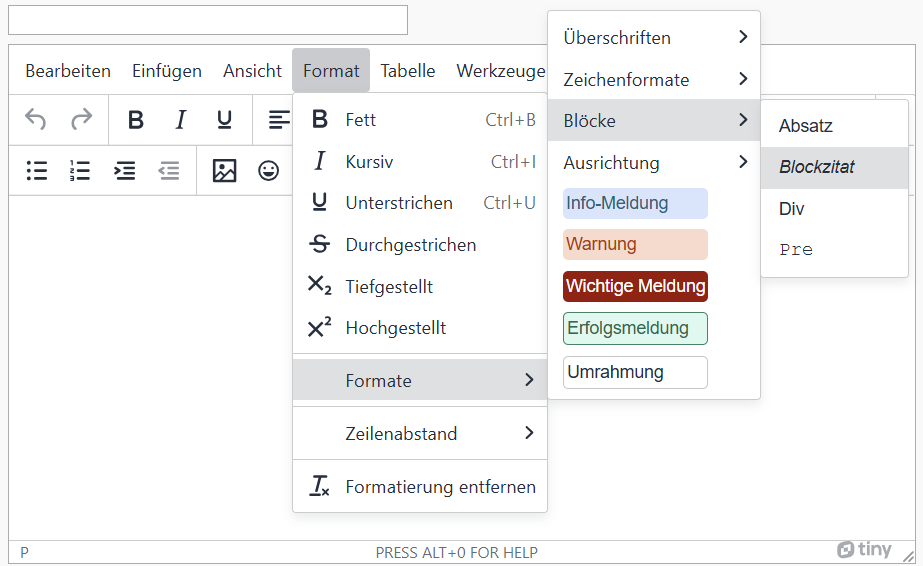
OPAL editor: Menu bar: Format > Formats > Blocks > Blockquote

BITV-Guidelines

  • HTML-Markup for quotes

PowerPoint does not have a style sheet for quotations.

For quotations, use the usual citation styles for the language you are using (quotation marks, information about the source in brackets, etc.).

The following criteria are taken from the checklist:
  • Quotations are marked as such.

Quotations must be marked with appropriate structural elements so that assistance systems can highlight them differently (color or vocal). It also allows keyboard users to skip the entire section.

Markup of Quotations
HTML tags: longer quotes: <blockquote>, Source of the quote: <cite>, inline quote: <q>
Example code of a blockquote
                  
                  <blockquote>
                      <p>This is an example of a long quote. It might contain multiple sentences, or even multiple paragraphs.</p>
                      <cite>Source of the Quote</cite>
                  </blockquote>


BITV-Guidelines

  • HTML-Markup for quotes
The following criteria are taken from the checklist:
  • Quotations in the text are indicated by quotation marks.
  • No block quotes are used.

Quotations must be marked with appropriate structural elements so that assistance systems can highlight them differently (color or vocal). It also allows keyboard users to skip the entire section.

Criteria and Barriers of ILIAS

Block quotes are not properly marked by the Ilias page editor and should be avoided.
Quotations in the text should be marked with quotation marks. The text highlighting "Quote" should not be used as it does not have a sufficient contrast ratio to the text.

The following criteria are taken from the checklist:
  • Quotations are marked as such. They are tagged using a <Quote> or <BlockQuote> structural element.

Quotations must be marked with appropriate structural elements so that assistance systems can highlight them differently (color or vocal). It also allows keyboard users to skip the entire section.

Markup of Quotations
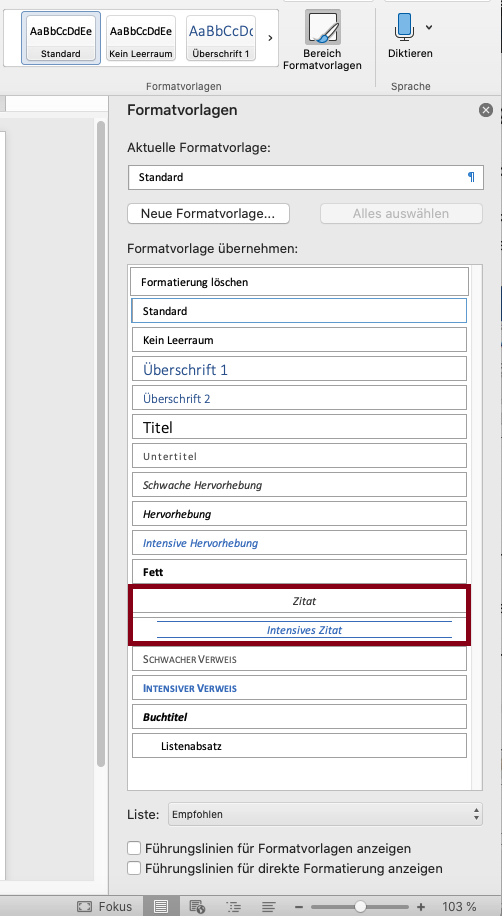
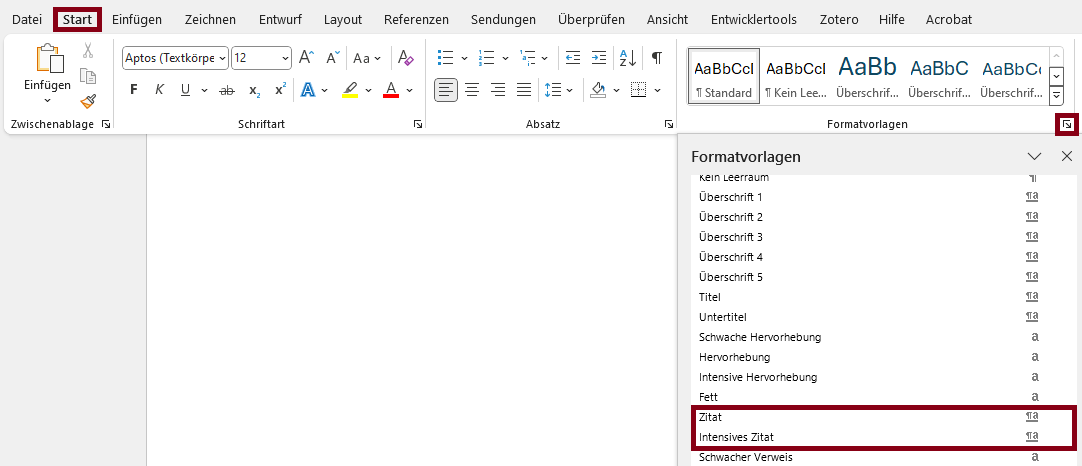
Microsoft Word: Menu bar: Home > Styles > Select Quote/Intense Quote
The following criteria are taken from the checklist:
  • Quotations are marked as such. They are tagged using a <Quote> or <BlockQuote> structural element.

Quotations must be marked with appropriate structural elements so that assistance systems can highlight them differently (color or vocal). It also allows keyboard users to skip the entire section.

Markup of Quotations

LaTeX does not currently support automatic tagging, so the correct tags must be added in post-processing.
See Guidebook: „Example PDF Tags“ for help with tagging.
State emblem of the Free State of Saxony: The lettering “Saxony” in black, below the stylized coat of arms of the Free State of Saxony in black on a white background. This measure is co-financed by tax funds on the basis of the budget approved by the Saxon state parliament.

v.0.11.1 - beta

  • Legal Notice
  • Data Protection
  • Accessibility
  • Checklist
  • Guidebook